RaiderPro - audio riding & automation Perpetual License
Get perfectly leveled audio in seconds
Perfect for music, podcasts, and content creators.
✔ No more volume automation headaches
✔ Keep audio consistent in any mix
✔ Sound professional instantly
Free updates for 6 months.

Couldn't load pickup availability

Customers are saying
Plugins
-
RaiderPro - audio riding & automation Perpetual License
Vendor:casa occidente4.9 / 5.0
(10) 10 total reviews
Regular price $35.00 USDRegular priceSale price $35.00 USD -
RaiderPro 7 Day Free Trial - audio riding & automation
Vendor:casa occidente5.0 / 5.0
(1) 1 total reviews
Regular price $0.00 USDRegular priceSale price $0.00 USD
Manual
The RaiderPro plugin by Casa Occidente provides a detailed guide on how to use the software to automatically balance vocal levels during a mix:
Overview
RaiderPro is designed to automate the process of adjusting audio track levels in a mix. Instead of relying solely on static compression or manual fader riding, it continuously monitors the signal and applies dynamic gain adjustments to maintain a consistent level.
Plugin Interface & Controls
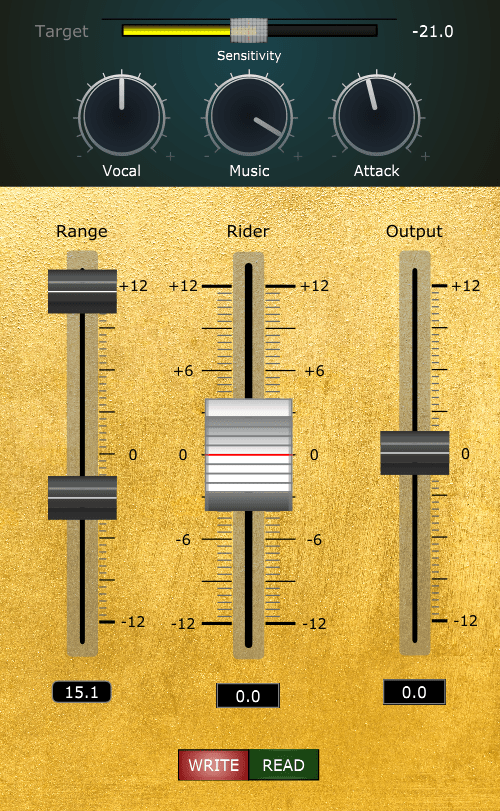
User Interface: Key parameters include:
Rider: Visually represents the amount of gain change (boost or reduction) that the plugin is applying to the signal. Usage: By watching this dynamic display, you can see how much the plugin is adjusting the vocal level in real time.
Target: The desired vocal level that the plugin will try to maintain.
Vocal Sensitivity : Controls the vocal detector sensitivity, which differentiates vocal content from noise floor, spill, and ambience, and identifies the beginnings and endings of words.
Music Sensitivity : Determines the amount RaiderPro adapts to changes in instrumental levels. (“Instrumental” refers to all tracks other than the vocal). Range: -6 to +6 dB.Please note: To use this control, the instrumental mix bus must be assigned to the Vocal Rider side-chain input.
Attack modulation: controls the response time at which the Rider slider changes the dynamics of the audio.
Output: Adjust output gain at any given moment.
Workflow Integration
Optimal placement in the signal chain : typically before other processors like compressors or equalizers.
Operational Principles
Algorithm Details: By tracking the dynamic range, the plugin automatically adjusts the gain to keep the vocal level steady, even as the performance varies.